Planet maemo: category "feed:64c65aade2c1b8d33917dbcfe404e0ec"

Brent Chiodo
One of my favorite Desktop Widgets on my N800 was the "Internet Search" applet. However, I was disappointed to find out that it was being dropped in Fremantle and there would be no official replacement. Since I wanted to learn a little more about programming for Fremantle and something as useful as a Search Widget wasn't available, I decided to tackle both at once.

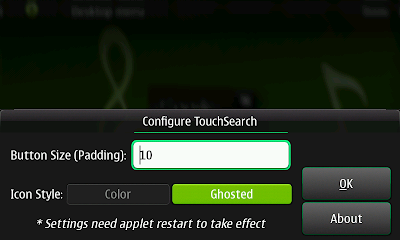
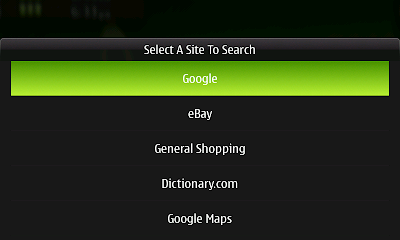
The widget is called TouchSearch, and it allows you to search the web right from your Fremantle Desktop. It has a decidedly different feel than the Nokia-made widget because of some of the Fremantle Desktop restrictions, but accomplishes roughly the same thing.

TouchSearch is currently in the extras-testing que and is in need of testers! So, if Touchsearch sounds useful, give it a whirl. The package page is here and it contains a link to the bugtracker if you find issues or want to request new features. Please leave a thumbs up/down if you test it (packages need to have +10 karma to be eligible to be promoted to regular extras). Thanks!

Here are some screenshots on Scratchbox:



Categories: development
Brent Chiodo

Preview: Quick Clip 0.5.0

2009-08-24 11:15 UTC  by  Brent Chiodo
0
0
Click to read 1715 words
Categories: quickclip
Brent Chiodo
I am one of those (seemingly many?) people that migrated from a Palm device to a Nokia N8X0. Being a longtime user of the Palm OS platform, I grew accustomed to some things being built right in to the platform e.g. the Palm PIM suite (Calendar, Tasks, Notes, Memos, Contacts). Although all of the PIM applications were really nice, the one I always found myself using most was the Tasks application.

I always thought a Calendar was a little strict (and extremely time-intensive to keep up) for my needs, and something like a plain-text memo-like reminder was too far the other way. Tasks was just perfect. Structure with compromise.

When I first got my N800, I was disappointed there was no Palm Tasks-like application. I've tried them all, and none were up to the task (no pun intended).

Recently (actually, like just the last couple days) I looked into programming my own solution. At this point it is merely a mock-up: no data storage, no functionality, no killer features (or features at all), but it presents the concept of my ideas.

I call it Quick Do (and no, it may have the same Quick prefix, but it will not be integrated in Quick Clip).

Here is the proposed main view: (also showing future filtering options)


And the Add Task dialog:


The Date selector:


Will this turn into an actual application, probably (after battling with the gtk.TreeView widget for hours already, I would hope so!). But more importantly, what do you think of the interface? Finger-friendliness is out-of-the-question, but anything else? I have a laundry list in my mind of features that could be added, so a little direction is welcome.

Feel free to leave comments below.
Categories: quick do
Brent Chiodo

Quick Clip 0.4.1 Released.

2009-04-17 17:14 UTC  by  Brent Chiodo
0
0
Today I'm pleased to announce the release of Quick Clip 0.4.1-1. What is Quick Clip? Quick Clip is the combination of a statusbar plug-in and text viewing application specifically designed for the Maemo platform. The statusbar plugin allows you to "clip" highlighted, or enter text directly, into a plain text file for later reference. While the text viewer easily allows you to read and/or access data you've already clipped.


New features in this release are:

* Added Clear submenu item
* Added Delete submenu item
* Switched to XML for target file list storage
* Switched storage location for user files
* Major code cleanup * Fixed Open Bug
* Fixed preinst script
* Renamed Open Settings button to Browse
* QCV: Changed preference warning to bold
* QCV: Added application menu
* QCV: Fixed bug in scrolling choice
* QCV: Added Select All option
* QCV: Added Right/Left buttons for flipping through clippings
* QCV: Added Properties submenu item
* QCV: Added Help menu item
* QCV: Mapped the +/- keys to increase/decrease font size
* QCV: Mapped the Up/Down D-Pad keys to scrolling (only for GTK)
* QCV: Changed Title (more path visible)
* QCV: Major code cleanup

Here are a few screenshots from the new release:


Categories: development
Brent Chiodo

Quick Clip .0.3.0 Released

2009-03-26 13:36 UTC  by  Brent Chiodo
0
0
After a longer-than-expected wait, Quick Clip version 0.3.0 is available for download. New things in this version include a much improved help system (now integrated with hildon-help), and a builtin Quick Clip Viewer. Here is the full changelog:

* Switched to hildon.banner for information/warnings/errors
* Now has Open button in settings dialog for easy file navigation
* Now uses hildon-help for builtin help
* Simplified About Dialog
* Added Donations sub menuitem
* Initial release of Quick Clip Viewer (beta)
* Now packaged with dpkg-buildpackage

You can download the new version from my website here.
Categories: development
Brent Chiodo

Quick Clip 0.2 Released!

2009-02-20 15:55 UTC  by  Brent Chiodo
0
0
Today I am happy to announce the release of Quick Clip 0.2. If you've been following along with Quick Clip's development, you'll know that I've been actively working to make it more robust and user friendly.
Click to read 972 more words
Categories: development