Planet maemo: category "feed:fc36e5571ff46aa3213a2f86f4ad3f55"

2008-08-13 00:27 UTC
0
0

boingo mobile

Boingo Mobile has been updated across platforms. If you use a Nokia Handset (N or E Series), Nokia Tablet or a Windows Mobile Handset it’s worth checking out the new download. If you’ve used Boingo on your tablet I’m sure you’ll agree the auto-connect feature is very slick. I’ve gotten a ton of use from Boingo in my travels and definitely recommend it.

Technorati Tags: , , , ,

Categories: Applications
Tags: , , , ,
2008-08-12 22:10 UTC
0
0

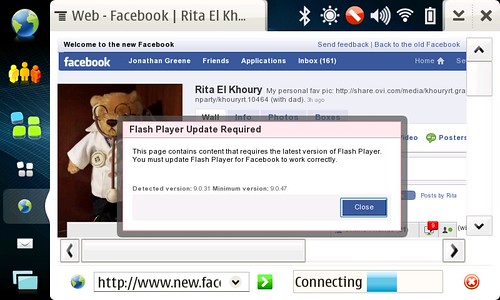
I was just browsing Facebook and ran across this little issue … There is no way to install Flash directly on a mobile device as a browser plugin! Looks like I will have to wait it out for an update to the OS, but since we just got one this week, it may be a while …

Technorati Tags:

Categories: Applications
Tags:
2008-08-12 14:13 UTC
0
0

Last night I noticed that there was a new update to OS2008 designed to enhance the email and browser … My last experience with the software update was from a re-flash and I remain very impressed with how this worked as well.

I chose to do a backup (safety first) but had no need to restore. After a required reboot, my system was humming again. I can’t say I am noticing any real changes with this update, but I was not having any problems with the browser or email either …

Doing this without a computer is impressive and something I hope makes it to more mobile devices.

Categories: Software Updates
2008-08-03 18:52 UTC
0
0

The previous mention of Mauku was an unstable version supporting Twitter concurrently with Jaiku. Today though we get a nice update to the official release in .5.1 which seems far more stable and able to handle the volume of connections both services require.

If you participate in either or both Twitter and Jaiku, Mauku is the gold standard for staying in touch. While twitter offers considerably less organization than Jaiku, Mauku makes it easy to stay connected.

Technorati Tags:

Categories: Applications
Tags:
2008-07-30 17:07 UTC
0
0

The results are in on the Tabletblog poll and looks like the majority would love a 3G enabled N810 over the pending WiMax device. I know I’d love the 3G tablet! I tether regularly with my phones (currently the Nokia E71), but having an independently mobile connection would be killer.

Having wireless beyond wifi really makes the Nokia Internet Tablet that much more powerful. The initial plans, as seen in our current devices, were to pair with your phone and extend the online experience. As I think many of us clearly realize there’s been a lot of action in the MID and UMPC space as of late, but I’d be willing to bet that few if any of these devices have yet to match the N810 in capabilities. Sure some have more power on the CPU or grpahics end, but none can offer 5 hours of battery life or fit in your pocket.

3G would certainly impact battery life as it does with everything else, but it seems like an acceptable give, in order to get a considerably greater range of use.

Technorati Tags: , , , , , ,

Categories: Views
Tags: , , , , , ,
2008-07-25 13:47 UTC
0
0

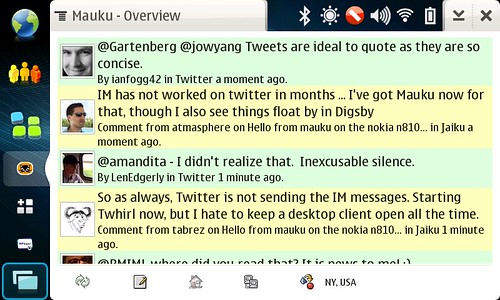
Mauku has long been the best way to stay connected to Jaiku regardless of platform and today we’ve received a very nice update that adds Twitter into the fold as well. I’ve gotten a lot of questions on how to stay connected to twitter from the tablet and outside of IM which has not worked for months, the web site was the only solution until now.

screenshot05

In the above screenshot, Twitter updates are green and Jaiku are yellow. In one view, you’ve got a simple dashboard into the social conversation. The Mauku UI is optimized for finger touch over stylus and supports gestures as well if you’ve never seen it in action. For now the update is only in the unstable repository (change user to unstable in the repository setting after you install), though I’d imagine with the excitement around this release, we’ll be able to sort out the bugs and move it to release very quickly.

Technorati Tags: , , ,

Categories: Applications
Tags: , , ,
2008-07-21 03:21 UTC
0
0

Nokia Chat is a new beta labs release from Nokia for their handsets, but because it’s a jabber based chat system, you can easily take advantage of the basic features on your tablet as well. In my case, I’m extending my usage on the E71 through my desktop (Adium and Digsby) and also on the N810.

With your account created, you can simply add a new jabber IM account on the tablet using chat.ovi.com as the server and stay in touch just like any other IM account. Nokia chat offers some very cool location based stuff along with address book integration which unfortunately does not extend to the Tablet just yet. I have no idea if we’ll get to see anything connect with the pretty limited contact list on the tablet, but certainly the location settings would be very cool to use. On the handset, you can use Landmarks saved from either Nokia Maps or Google Maps. I’d imagine we’ll have to wait until the launch of Nokia Maps on the web which will hopefully also include Plazes integration.

I’m atmasphere [at] ovi.com if you’d like to connect.

Categories: Applications
2008-07-21 03:11 UTC
0
0

Tonight I decided to reflash my N810 … I don’t normally decide to reflash a device too easily as the re-install process is always a pain. With the arrival of 2008, that process has gotten easier, but finally with Diablo dare I say it’s almost friendly.

Click to read 620 more words
Categories: Software Updates
2008-07-03 14:10 UTC
0
0

side effect of hacking your tablet too much

Just tried to rotate my screen to see an iphone web app and … whoa. I found the menu’s were in order over on the left side, but I had to “use the force” to figure out where to click to get things restored.

Technorati Tags: , , , , ,

Categories: Applications
Tags: , , , , ,
2008-07-02 23:25 UTC
0
0

File this under experimental but very cool … There’s a great thread on ITT which describes how to install Android on your tablet. So far it’s pretty simple and straight forward. I had to reboot to get Android to actually launch, but otherwise it’s all there … at least what’s available. Much more to try and will see about installing some apps soon as well.

Technorati Tags: , , , , ,

Categories: Applications
Tags: , , , , ,
2008-06-26 22:49 UTC
0
0

This is such a simple tip I can’t believe I did not discover it sooner, but thanks to reader Mobiledivide, I’ve learned how you can very easily enable graphics in the Modest mail client. This should work for Diablo as well as pre-Diablo installs of Modest.

Via the Maemo Extras repository, download an application called gconf-editor, which will let you control all kinds of interest settings for various apps. I imagine you might be able to do some damage if you are not too careful, but for this purpose, all should be fine.

Once installed, fire it up and navigate to Apps / Modest. You should see something that looks like this:

gconf-editor - Fetching external images in Modest

I’ve already checked the fetch external images option which is what you need to check in order to get HTML mail fully enabled. That’s it. Enjoy!

Technorati Tags: , , , , ,

Categories: Applications
Tags: , , , , ,

sponsored by Nokia Corporation