Planet maemo: category "feed:5bc2385bc6ad322a949feafe5e504227"

Michael Sheldon

StatusNet client for the Nokia N9/N950

2012-04-03 15:58 UTC  by  Michael Sheldon
0
0

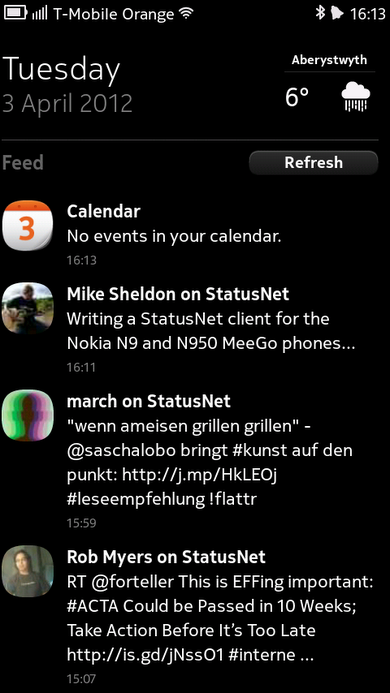
StatusNet messages in the MeeGo events feed

There’s one thing that my Nokia N950 has been lacking and that’s a StatusNet client, so I set about hacking one together. I love the way that the N9/N950 events feed displays messages from Twitter and Facebook, so my main focus so far has been to integrate with this. I’ve now got my client to a stage at which it covers most of my own needs so I thought I’d make an early release for others to play with.

Once I’ve extended it a little further I plan on submitting it to both Apps For Meego and the general Nokia Ovi Store, but for now you can download the Debian package directly here.

One thing to note is that you will need to restart your phone before events will start to appear (this is due to a limitation in the way the SyncFW framework loads plugins).

The client is written mostly in Python, with a little C++ for integrating with the events synchronisation framework. It makes use of the StatusNet module written for the command line StatusNet client IdentiCurse and the python-eventfeed module written by Thomas Perl.

Features

* OAuth login for identi.ca.
* Standard login for any other StatusNet services.
* Shows messages in the events feed.
* Fetches (and caches) user avatars.
* Displays messages from the events feed in the browser when clicked.
* Automatically fetches new messages in the events feed based on your events feed preferences.
* Can manually fetch new messages via the events feed ‘Refresh’ button.

Not yet implemented

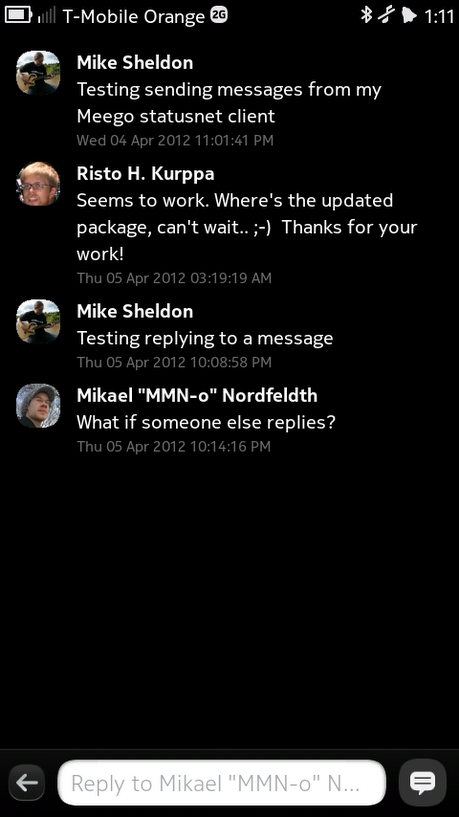
* Posting messages.
* Displaying messages locally within the application.
* Displaying rich content (messages with multimedia attachments)

Download

Ovi Store: StatusNet for MeeGo
Direct download: statusnet-meego_0.1-3_armel.deb

Source

License: GPL version 3.0 or later
Gitorious repository: https://gitorious.org/statusnet-meego-plugin
Ohloh project page: https://www.ohloh.net/p/statusnet-meego

Categories: Development
Michael Sheldon

Box2D and Box2D-QML for Harmattan

2011-07-15 16:44 UTC  by  Michael Sheldon
0
0

I’ve just built some Box2D and Box2D-QML packages for Harmattan. The Box2D-QML package is especially interesting, this wraps the Box2D API as QObjects allowing them to be made use of directly from within QML. So you don’t need any extra C++ to handle physics simulation for simple games or similar. Here’s a short video of one of the demos running on an N950:

The source code for the above demo can be seen in the Box2D-QML repository here: Monera Example and thanks to these wrappers is very simple.

Packages for the N9/N950 can be found in my OBS repository, simply download elleo.list into /etc/apt/sources.list.d/ and run apt-get update to make the repository available on your device, or just download the packages you’re interested in directly from http://repo.pub.meego.com/home:/elleo/Harmattan/armel/.

Many thanks to the Box2D and Box2D-QML teams for creating such nice tools, I’d certainly recommend them to anyone interested in 2D game development on the N9/N950 phones.

Categories: Development
Michael Sheldon

Last week I got the news that I’d been accepted into Nokia’s community device program and would be receiving a Nokia N950 so that I could help produce some nice open source MeeGo apps ready for the launch of the Nokia N9 later in the year. The device hasn’t arrived yet, but I’ve already started on the first of my projects which is to create a Libre.fm radio client. Most of the basic functionality now works including authentication, tuning to stations, playing, pausing and skipping back and forth through the playlist. I won’t be making a release until after I’ve had a chance to actually test it on the device itself, but the code is all in the GNU FM git repository. Here’s a quick video of it in action:

Categories: Development
Michael Sheldon

This tutorial takes you through the steps necessary to build a simple application which is capable of displaying data from OpenStreetMap and find driving routes between two locations without the need for any network services.

Click to read 3360 more words
Categories: Development
Michael Sheldon

Jokosher on the Nokia n900

2010-06-18 01:05 UTC  by  Michael Sheldon
0
0

I’ve had another stab at getting Jokosher running on the Nokia n900 and I’m getting much closer to something actually usable now, as this screenshot attests:

Jokosher on the Nokia n900

There’s still a number of issues that need resolving before it’s really ready for use (most notably some playback/recording problems and some dialog boxes that are too large for the screen), but it’s getting there. When it’s working fully it could make the n900 a very useful device for portable podcasting, allowing users to record, edit, mix, encode and upload their roaming shows with nothing more than their phone.

Categories: Development
Michael Sheldon

GStreamer OpenCV plugins on the Nokia n900

2010-06-17 15:49 UTC  by  Michael Sheldon
0
0

A while back I wrote a few GStreamer plugins that expose OpenCV functionality as GStreamer elements (source code), I haven’t had much time to work on these recently myself, but thankfully a number of other folks have started contributing now. Yesterday Daniil Ivanov kindly packaged gst-opencv for the maemo extras-devel repository, and the n900 performs surprisingly well considering how CPU intensive many of the vision operations performed are.

This first video shows edge detection being performed from the n900′s main camera (whilst simultaneously being encoded):

Example gst-launch line: gst-launch v4l2camsrc device=/dev/video0 ! video/x-raw-yuv,width=480,height=272 ! videorate ! video/x-raw-yuv,framerate=12/1 ! ffmpegcolorspace ! edgedetect ! ffmpegcolorspace ! xvimagesink

This second video shows the faceblur element in action, it detects any faces in the current scene and blurs them out, the frame rate and resolution on this one had to be reduced somewhat due to the complexity of the operation, it looks clearer when performed directly to an xvimagesink rather than attempting to encode at the same time.

Example gst-launch line: gst-launch v4l2camsrc device=/dev/video0 ! video/x-raw-yuv,width=240,height=136 ! videorate ! video/x-raw-yuv,width=240,height=136,framerate=6/1 ! videoscale ! video/x-raw-yuv,width=120,height=68 ! ffmpegcolorspace ! faceblur profile=/home/user/haarcascade_frontalface_default.xml ! ffmpegcolorspace ! xvimagesink

For some more examples of the gst-opencv plugins in action on a normal desktop machine take a look at thiagoss’ blog post and a couple of videos by Alexandre Poltorak (edge detection and face blurring).


Categories: Development