Planet maemo

Andrew Flegg

MWKN Weekly News for Monday, 5 Mar 2012

2012-03-05 10:53 UTC  by  Andrew Flegg
0
0
Front Page

Enabling Google Talk video calling on Nokia N9

With the release of PR 1.2 comes a very welcome software addition - Google Talk Video Calling. Simply download the application from the store and it integrates with your existing GTalk account. Initiating and receiving calls worked well in your editor's testing.

Read more (meegoexperts.com)

In this edition (Download)...

  1. Front Page
    • Enabling Google Talk video calling on Nokia N9
  2. Applications
    • Visual updates for gPodder on N9 under development
    • Open source Password Generator for N9 available in Nokia Store
    • Drop Cache for N9 flushes disk cache, preventing data loss and freeing memory
  3. Development
    • Mer-based IVI Hardware and UIs
    • Penetration tools for Harmattan
    • Hardware accelerated OpenGL ES on N9 in Java VM
  4. Community
    • Intro to Tizen and the Future of the Community: Dawn Foster's FOSDEM talk slides
  5. Devices
    • Problems installing N9 apps or updates?
Stephen Gadsby

maemo.org Extras Bug Jar 2012.10

2012-03-05 00:02 UTC  by  Stephen Gadsby
0
0

A Quick Look at Extras in Bugzilla
2012-02-27 through 2012-03-04

Click to read 2704 more words
Categories: Extras
Michael Hasselmann

Maliit as your remote control (video)

2012-03-04 23:50 UTC  by  Michael Hasselmann
0
0

There is seemingly a trend (in ideas) to use your mobile device as a remote control for stationary devices such as your TV.

We thought that experimental support for remote text input should be easy to add to Maliit, as it already comes with a server-client architecture. As soon as client and server can run on different host machines, we’d have network transparency and it should basically just work. Luckily, we use D-Bus as our IPC, and it turns out that D-Bus understands remote host addresses. If you check the README in maliit-framework you will recognize that – with the latest release (0.90.0) – it only takes an additional environment variable, MALIIT_SERVER_ADDRESS, to connect a client (that is, an application that uses the Maliit input context) to the input method server. The scary part is perhaps that one has to disable D-Bus authentication. Therefore it's a good idea to only use this inside a trusted network.

Jon created a video which demonstrates the new feature in a better way, using a laptop that is connected to a projector as a TV replacement. The great thing about this feature is that it requires no changes to the applications, nor to the Maliit input method plug-ins, it’s the framework that handles this internally (or not so internally, now that Qt 5 turned our D-Bus API into a public one).

However, to make Maliit truly useful as a remote control, at least two additional features are required:

  • Have a proxy text editor widget on mobile device that allows text interactions such as copy and paste, cursor positioning and rich text formatting.
  • Emulate and transmit mouse or touch events, possibly through a dedicated touch area on the touch screen of the mobile device.

The second feature requires an extension to the Maliit protocol, whereas the first is already filed as bug MALIIT#84. After that, I could use my N9 (or my N900, as Maliit also runs there) to remote control my Gnome or Ubuntu Unity desktop, which would work perfectly for my movie watching habits. Kudos goes to Krzesimir and Jon for their work on this feature.

Permalink | Leave a comment  »

santtuahonen

Dear eager N9 developers!

We know that you are interested in updating your devices to PR1.2 as fast as possible, but we propose that you restrain yourselves to the fully productized and verified updating procedure.

The availability of the update is based on the variant of the Harmattan operating system on your device, and not the current operator or your physical location. See Harmattan version numbers explained (23-Jan-2012) for further details.

The over the air updates are rolled out on a per-variant basis. Some variants are released earlier, and others obviously later. The exact schedule depends on various aspects, including but not limited to variant volumes, time zones and e.g. network owner approval. Please have patience waiting for the update notification to appear on your device.

We recommend that you do not apply your skills or other voodoo in forcing the update from the terminal application. While manually tweaking the settings and trying to force the update may seem to work, you may also end up bricking your device or otherwise rendering the platform or applications to an unexpected state.

A variant release consists of packages that have dependencies to each other. Different variants have different packages and different dependencies. Additionally, apt-get is a component of full software delivery stack and using it directly is not advised. If a user e.g. forces an update of a variant on top of another variant by manually tweaking repository information, this may result in some packages not getting updated, and some being otherwise wrong.

To update your device, only use the over the air updates with device graphical user interface or the Nokia Software Updater.

Remember that great powers come with great responsibility: the warning of potentially losing your warranty when enabling developer mode is there for a reason. The terminal enables you to do plenty of impressive things, but it also enables you to mess up your device's configuration and contents in a spectacular fashion.

In addition, some users have experienced sluggishness on first boot after the update. That is to be expected and is a sign of ongoing cleanup and re-indexing. It should be fairly fast, only a minute or so for most users. However, the duration is dependent on the amount of data stored on the device, and thus the sequence may take significantly longer as well.

Categories: MeeGo
Andrew Flegg

MWKN Weekly News for Monday, 27 Feb 2012

2012-02-27 13:35 UTC  by  Andrew Flegg
0
0
Front Page

Nokia N9 PR1.2 now available over-the-air

The long-awaited PR1.2 update is now available for Nokia N9 users.

Go to Settings > Applications > Manage applications > Update.

In this edition (Download)...

  1. Front Page
    • Nokia N9 PR1.2 now available over-the-air
  2. Applications
    • Avoiding jet lag with continuous clock change
    • Daily Wallpaper is Qt Ambassador project of the week
    • Two new FM Radio frontends for N9
    • ...and 3 more
  3. Development
    • Mer Platform SDK can now build itself
    • Reverse engineered "WhatsApp" client can send messages
    • Harmattan PR1.2 requires Secure APT repositories
    • Qt Components running on BlackBerry Playbook
  4. Community
    • maemo.org Extras Testing/QA refresh
  5. Devices
    • Nokia launch WP, Series 40 & high-end camera phones - no sign of Qt for next billion
  6. Announcements
    • WiFik - WiFi scanner for Harmattan
    • MaeMeeMo - a MeeGo Harmattan Nemo modification pack for Maemo 5
    • Personal Web Server for Nokia N9
    • ...and 6 more
Tuomas Kulve

N950 display breaking down

2012-02-27 10:23 UTC  by  Tuomas Kulve
0
0

My N950’s display started to grow black stripes some weeks ago:

The lines are getting longer and thicker day by day. And now an N950 of a friend of mine started to do the same thing. I wonder if this is happening to all of them?

N9 is the only viable option for me with its own pros and cons. Hopefully it won’t disappear too quickly from the shops..

Categories: Maemo
Stephen Gadsby

maemo.org Extras Bug Jar 2012.09

2012-02-27 00:02 UTC  by  Stephen Gadsby
0
0

A Quick Look at Extras in Bugzilla
2012-02-20 through 2012-02-26

Click to read 2946 more words
Categories: Extras
Andrew Flegg

http://www.developer.nokia.com/Community/Blogs/blog/andrew-fleggs-nokia-developer-blog/2012/02/26/avoiding-jet-lag-using-continuous-clock-change

These days I'm often travelling long distances; whether it's to Asia or Detroit with work; or San Francisco for the MeeGo and JavaOne Conferences.

Ten hour flights are rarely fun; but when combined with a ten hour time difference? The jet lag can destroy you.

However, I trust a clock when I see it. So if I can convince myself that the time isn't changing in one big jump, jet lag is less of an issue. I used to do this with my watch: every two hours on a ten hour flight with an eight hour time difference: move my watch forward two hours. By speeding up, or slowing down time, I find it excellent for transitioning gradually to my destination timezone.

My N9's standby screen provides an opportunity to do this automatically: every time I glance at my phone on the flight, it could show me the right "transient" time.

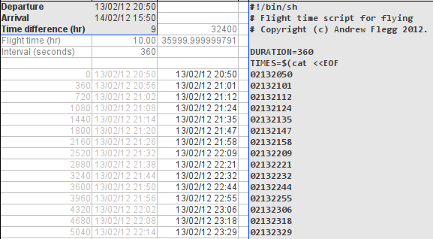
I prototyped it with a spreadsheet (download), for a recent trip to Korea, to see how effective it would be before writing an app:


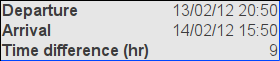
To try it out, first off, enter the local departure and arrival times; and the timezone difference:

If travelling eastwards, the time difference will be positive. If travelling westwards, it will be negative.

A shell script will then be shown in column E. Copy this column and paste it into a text editor. Copy the resulting script to your UNIX-based mobile device (N9, N950, N900, N8x0, jailbroken iPad).

On a Harmattan device, the script needs to be run in develsh:

~ $ develsh outbound.sh
...

On everything else it needs to be run as root:

Jaffas-iPad:~ mobile$ su -
Password:
Jaffas-Ipad:~ root# sh outbound.sh
...

If run with screen or nohup, you shouldn't even need to keep the terminal open.

NEXT STEPS

Obviously the next step is an app. Is it something you'd be interested in? Is there a nice Qt API for changing the time? Are there Qt APIs for looking up timezones, and setting the device's timezone?

Thanks to eipi for allowing me to use MaeFlight's icon in this post. Also published on Nokia Developer blogs

Andrew Flegg

Avoiding jet lag using continuous clock change

2012-02-26 18:38 UTC  by  Andrew Flegg
0
0

These days I'm often travelling long distances; whether it's to Asia or Detroit with work; or San Francisco for the MeeGo and JavaOne Conferences.

Ten hour flights are rarely fun; but when combined with a ten hour time difference? The jet lag can destroy you.

However, I trust a clock when I see it. So if I can convince myself that the time isn't changing in one big jump, jet lag is less of an issue. I used to do this with my watch: every two hours on a ten hour flight with an eight hour time difference: move my watch forward two hours. By speeding up, or slowing down time, I find it excellent for transitioning gradually to my destination timezone.

My N9's standby screen provides an opportunity to do this automatically: every time I glance at my phone on the flight, it could show me the right "transient" time.

I prototyped it with a spreadsheet (download), for a recent trip to Korea, to see how effective it would be before writing an app:


To try it out, first off, enter the local departure and arrival times; and the timezone difference:


If travelling eastwards, the time difference will be positive. If travelling westwards, it will be negative.

A shell script will then be shown in column E. Copy this column and paste it into a text editor. Copy the resulting script to your UNIX-based mobile device (N9, N950, N900, N8x0, jailbroken iPad).

On a Harmattan device, the script needs to be run in develsh:

~ $ develsh outbound.sh
...

On everything else it needs to be run as root:

Jaffas-iPad:~ mobile$ su -
Password:
Jaffas-Ipad:~ root# sh outbound.sh
...

If run with screen or nohup, you shouldn't even need to keep the terminal open.

NEXT STEPS

Obviously the next step is an app. Is it something you'd be interested in? Is there a nice Qt API for changing the time? Are there Qt APIs for looking up timezones, and setting the device's timezone?

Thanks to eipi for allowing me to use MaeFlight's icon in this post. Also published on Nokia Developer blogs

Categories: #jf
monkeyiq

The Nokia N9: Going for a spin

2012-02-26 15:55 UTC  by  monkeyiq
0
0
In short, I now have a Nokia n9, and setup a scratchbox for it, and compiled & installed abiword, clawmotia, unison, and libferris for and on the device. If that didn't enlarge your page down key, the longer version now follows ;-)
Click to read 1364 more words
Categories: abiword
calvaris

Mixed QML/C++ objects

2012-02-24 19:16 UTC  by  calvaris
0
0

One of the good things of QML is that you can have both C++ and QML code and interact between them. For example, from C++, you can access the QML tree and invoke methods, change properties, etc.

The other way around, you can also define C++ objects and interact with them from QML. Here you have two ways of doing it:

  • Instantiating from C++ and adding the objects to the QML context, meaning that you can invoke the public slots and access the properties.
  • Registering the QML type with qmlRegisterType and then instantiating it from QML.

At the Qt documentation you can find examples about how to implement the different approaches so I won’t talk too much about them and I’ll focus in a special case of the last approach.

Let’s see a QML code like this:

Item {
    id: myObject
    function doCoolStuff() {
        // doing really cool stuff here
    }
    Rectangle {
        anchors.fill: parent
        color: "red"
    }
}

Button {
    text: "Do cool stuff!"
    onClicked: myObject.doCoolStuff()
}

Imagine now that painting that rectangle is something that must be really done by your object, because it is needed and inherent to it, and so is the function. If the code is written only in QML, the answer is obvious, just move the whole Item code to a .qml file and leave the main code like this:

MyObject {
    id: myObject
}

Button {
    text: "Do cool stuff!"
    onClicked: myObject.doCoolStuff()
}

Let’s suppose that you need some C++ code in that object for whatever reason (you want to use some GNOME library, for instance). In this case you need to write it in C++ to define the public slots in that language. Our first step would be something like this:

#include <QtCore>
#include <QtDeclarative>

 class MyObject : public QDeclarativeItem
 {
     Q_OBJECT

// Define some Q_PROPERTY here with its methods

 public slots:
     void doCoolStuff(void);

// We could even define some signals
 };

For the slot, it does not matter if you declare it as slot or with Q_INVOKABLE because QML will see it both ways. Of course, don’t forget to write the cpp file with the implementation for the slot

Categories: Igalia.com
nokian900freak

Ren’Py visual novels on the N900

2012-02-23 13:19 UTC  by  nokian900freak
0
0

With not so strong aspect of gaming on the N900, some gaming engines can be great, as they can provide us with tons of games to play. Well, there’s one engine ported to the N900 I’d love to tell you about: Ren’Py!

Ren’Py is a visual novel engine which allows you to create and/or play various visual novels. It holds a database of many novels created with it, both by amateurs and some more professional companies. Many well-known VN’s have been created with its help, Katawa ShoujoKatawa Shoujo, for example.

If you don’t know what a visual novel is, in short, it’s a Japanese genre of interactive fiction games, close to those good ol’ “choose-your-own-adventure” game books, but with music and pictures. You can read the article on WikipediaWikipedia, if you wish to learn more.

With the Ren’Py port, you’re free to play many of those right on your N900, which may suit you if you’re travelling/waiting for something and wish to kill time. Right now it’s available in Extras-develExtras-devel only, so go and enable it before running

sudo gainroot

apt-get install renpy-launcher python-renpy

To get it. Disable it afterwards. Before you launch any VN, you’ll need to fix a couple of issues, mainly the keyboard shortcuts and a small issue with text input. Get the patched versions of two config files and force-copy them over the old ones:

wget http://talk.maemo.org/attachment.php?attachmentid=11071&d=1276592409

wget http://talk.maemo.org/attachment.php?attachmentid=11122&d=1276701240

sudo gainroot

cp -f main.py.txt /opt/renpy/renpy/main.py

cp -f config.py.txt /opt/renpy/renpy/config.py

After that, you’re free to try any novels from the database or try the small novel shipped with Ren’Py. Most of the games can be launched by extracting them anywhere, cd’ing into them and running

python2.5 /opt/renpy/renpy.py ./

Some may require trickery, like symlinking them to /opt/renpy and launching them from the launcher (with “Select Project” -> “Launch”)

The overall performance of the games is pretty good, although there are a few issues. For example, 95% of the games will have the bottom of the screen cropped when launched in a window (usually by default), so you’ll have to play them fullscreen. And things like click sounds can be huge laggers, you might want to disable them from the options file of the game.

Apart from that, most games run very well, making Ren’Py a good thing to have if you’re into visual novels or need something to kill time.


Categories: Featured