

Planet maemo: category "feed:218abbb3f30ed17e36476558d8bce9b5"

Enrique Ocaña González

Now that 2025 is over, it’s time to look back and feel proud of the path we’ve walked. Last year has been really exciting in terms of contributions to GStreamer and WebKit for the Igalia Multimedia team.

With more than 459 contributions along the year, we’ve been one of the top contributors to the GStreamer project, in areas like Vulkan Video, GstValidate, VA, GStreamer Editing Services, WebRTC or H.266 support.
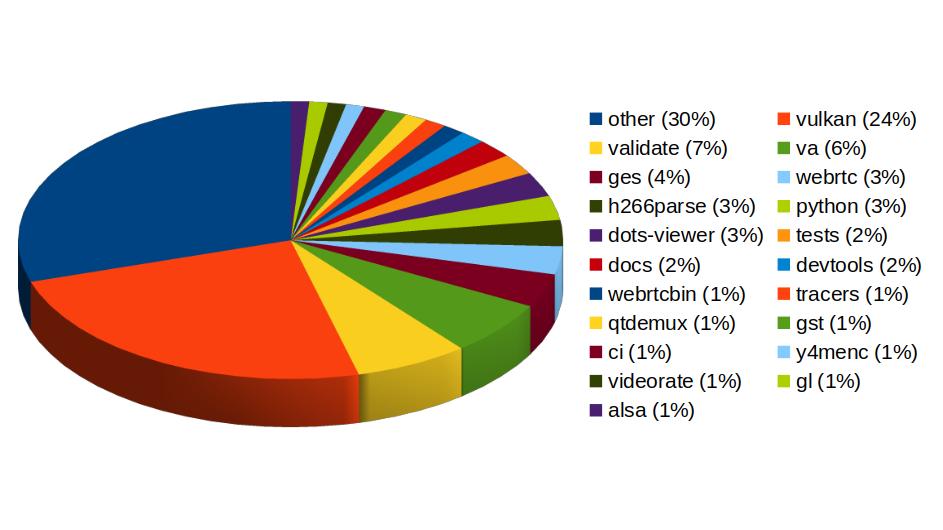
Pie chart of Igalia's contributions to different areas of the GStreamer project:
other (30%)
vulkan (24%)
validate (7%)
va (6%)
ges (4%)
webrtc (3%)
h266parse (3%)
python (3%)
dots-viewer (3%)
tests (2%)
docs (2%)
devtools (2%)
webrtcbin (1%)
tracers (1%)
qtdemux (1%)
gst (1%)
ci (1%)
y4menc (1%)
videorate (1%)
gl (1%)
alsa (1%)Igalia’s contributions to the GStreamer project

In Vulkan Video we’ve worked on the VP9 video decoder, and cooperated with other contributors to push the AV1 decoder as well. There’s now an H.264 base class for video encoding that is designed to support general hardware-accelerated processing.

GStreaming Editing Services, the framework to build video editing applications, has gained time remapping support, which now allows to include fast/slow motion effects in the videos. Video transformations (scaling, cropping, rounded corners, etc) are now hardware-accelerated thanks to the addition of new Skia-based GStreamer elements and integration with OpenGL. Buffer pool tuning and pipeline improvements have helped to optimize memory usage and performance, enabling the edition of 4K video at 60 frames per second. Much of this work to improve and ensure quality in GStreamer Editing Services has also brought improvements in the GstValidate testing framework, which will be useful for other parts of GStreamer.

Regarding H.266 (VVC), full playback support (with decoders such as vvdec and avdec_h266, demuxers and muxers for Matroska, MP4 and TS, and parsers for the vvc1 and vvi1 formats) is now available in GStreamer 1.26 thanks to Igalia’s work. This allows user applications such as the WebKitGTK web browser to leverage the hardware accelerated decoding provided by VAAPI to play H.266 video using GStreamer.

Igalia has also been one of the top contributors to GStreamer Rust, with 43 contributions. Most of the commits there have been related to Vulkan Video.
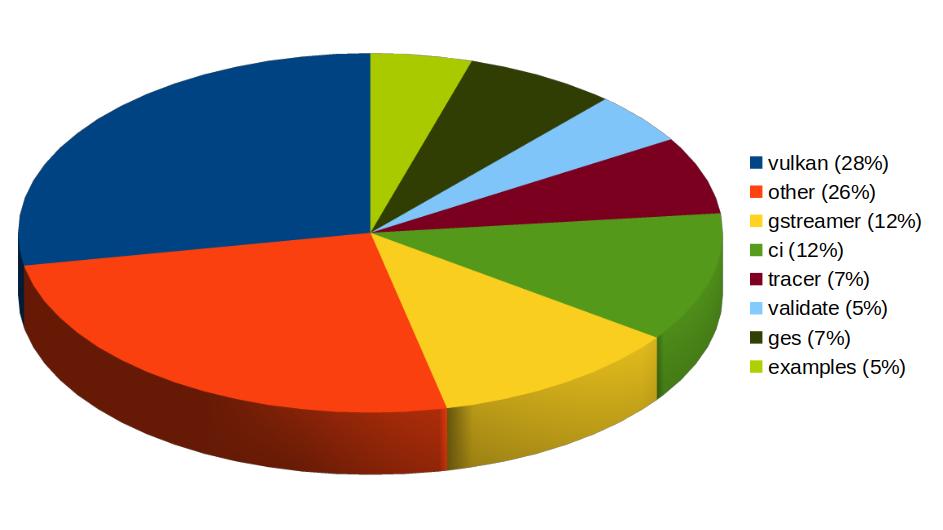
Pie chart of Igalia's contributions to different areas of the GStreamer Rust project:
vulkan (28%)
other (26%)
gstreamer (12%)
ci (12%)
tracer (7%)
validate (5%)
ges (7%)
examples (5%)Igalia’s contributions to the GStreamer Rust project

In addition to GStreamer, the team also has a strong presence in WebKit, where we leverage our GStreamer knowledge to implement many features of the web engine related to multimedia. From the 1739 contributions to the WebKit project done last year by Igalia, the Multimedia team has made 323 of them. Nearly one third of those have been related to generic multimedia playback, and the rest have been on areas such as WebRTC, MediaStream, MSE, WebAudio, a new Quirks system to provide adaptations for specific hardware multimedia platforms at runtime, WebCodecs or MediaRecorder.
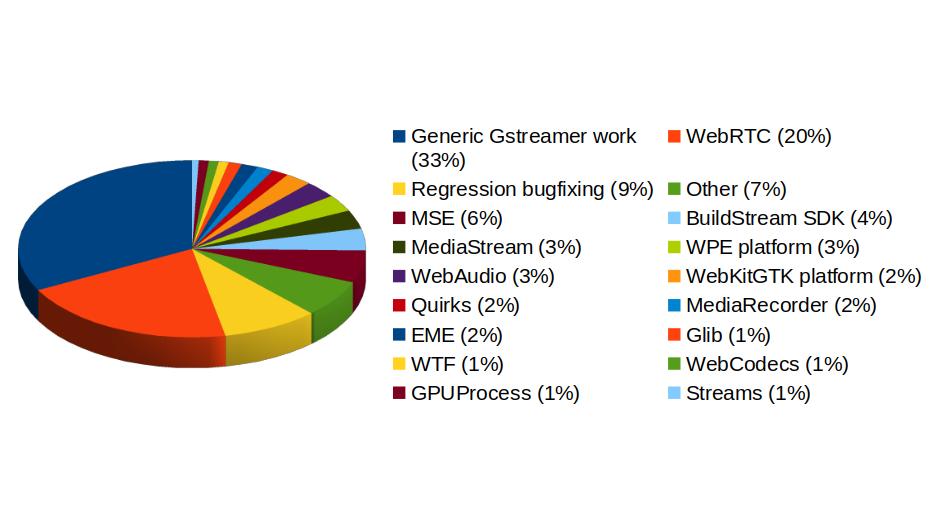
Pie chart of Igalia's contributions to different areas of the WebKit project:
Generic Gstreamer work (33%)
WebRTC (20%)
Regression bugfixing (9%)
Other (7%)
MSE (6%)
BuildStream SDK (4%)
MediaStream (3%)
WPE platform (3%)
WebAudio (3%)
WebKitGTK platform (2%)
Quirks (2%)
MediaRecorder (2%)
EME (2%)
Glib (1%)
WTF (1%)
WebCodecs (1%)
GPUProcess (1%)
Streams (1%) Igalia Multimedia Team’s contributions to different areas of the WebKit project

We’re happy about what we’ve achieved along the year and look forward to maintaining this success and bringing even more exciting features and contributions in 2026.
Categories: GStreamer
Enrique Ocaña González

Some years ago I had mentioned some command line tools I used to analyze and find useful information on GStreamer logs. I’ve been using them consistently along all these years, but some weeks ago I thought about unifying them in a single tool that could provide more flexibility in the mid term, and also as an excuse to unrust my Rust knowledge a bit. That’s how I wrote Meow, a tool to make cat speak (that is, to provide meaningful information).

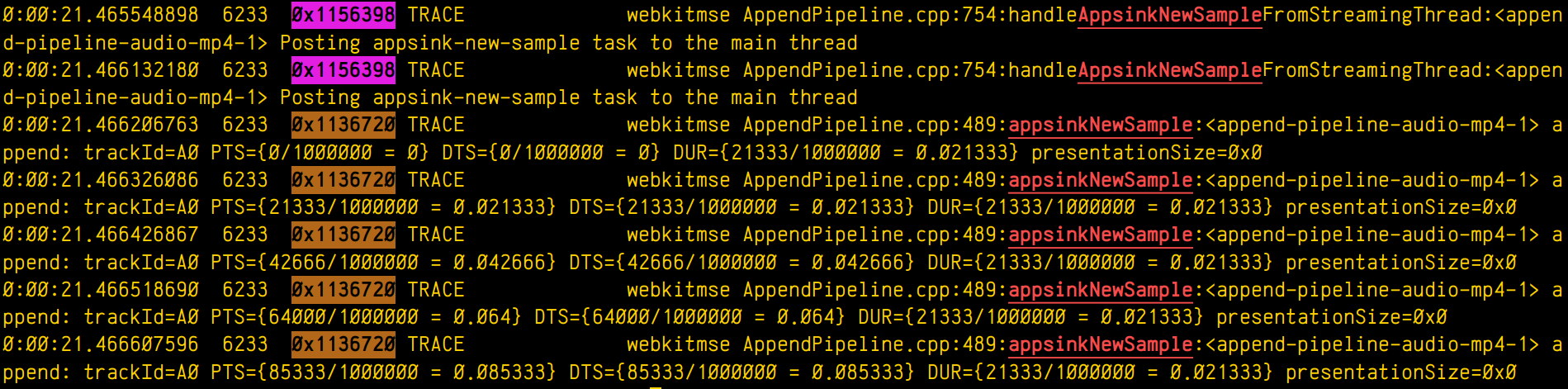
The idea is that you can cat a file through meow and apply the filters, like this:

cat /tmp/log.txt | meow appsinknewsample n:V0 n:video ht: \
ft:-0:00:21.466607596 's:#([A-za-z][A-Za-z]*/)*#'

which means “select those lines that contain appsinknewsample (with case insensitive matching), but don’t contain V0 nor video (that is, by exclusion, only that contain audio, probably because we’ve analyzed both and realized that we should focus on audio for our specific problem), highlight the different thread ids, only show those lines with timestamp lower than 21.46 sec, and change strings like Source/WebCore/platform/graphics/gstreamer/mse/AppendPipeline.cpp to become just AppendPipeline.cpp“, to get an output as shown in this terminal screenshot:

Screenshot of a terminal output showing multiple log lines. Some of them have the word "appsinkNewSample" highlighted in red. Some lines have the hexadecimal id of the thread that printed them highlighed (purple for one thread, brown for the other)

Cool, isn’t it? After all, I’m convinced that the answer to any GStreamer bug is always hidden in the logs (or will be, as soon as I add “just a couple of log lines more, bro

Categories: GStreamer
Enrique Ocaña González

The <video> element implementation in WebKit does its job by using a multiplatform player that relies on a platform-specific implementation. In the specific case of glib platforms, which base their multimedia on GStreamer, that’s MediaPlayerPrivateGStreamer.

Click to read 1838 more words
Categories: GStreamer
Enrique Ocaña González

Move semantics can be very useful to transfer ownership of resources, but as many other C++ features, it’s one more double edge sword that can harm yourself in new and interesting ways if you don’t read the small print.

Click to read 1506 more words
Categories: Chromium
Enrique Ocaña González

Dissecting GstSegments

2024-04-30 06:00 UTC  by  Enrique Ocaña González
0
0

During all these years using GStreamer, I’ve been having to deal with GstSegments in many situations. I’ve always have had an intuitive understanding of the meaning of each field, but never had the time to properly write a good reference explanation for myself, ready to be checked at those times when the task at hand stops being so intuitive and nuisances start being important. I used the notes I took during an interesting conversation with Alba and Alicia about those nuisances, during the GStreamer Hackfest in A Coruña, as the seed that evolved into this post.

Click to read 1214 more words
Categories: GStreamer
Enrique Ocaña González

Cat’s Panic

2023-01-06 03:32 UTC  by  Enrique Ocaña González
0
0

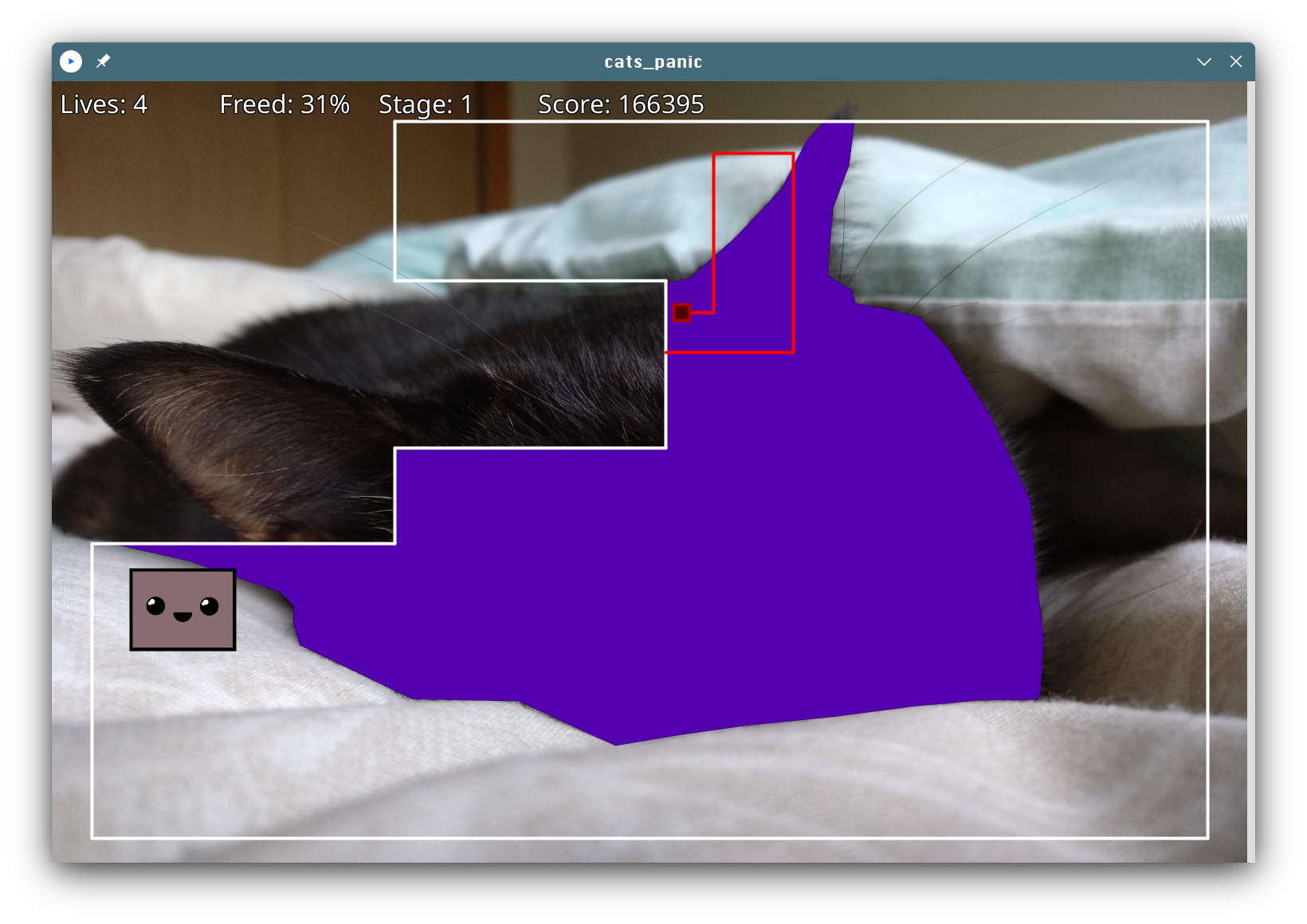
It’s been 8 years since the last time I wrote a videogame just for personal fun. As it’s now become a tradition, I took advantage of the extra focused personal time I usually have on the Christmas season and gave a try to Processing to do my own “advent of code”. It’s a programming environment based on Java that offers a similar visual, canvas-based experience to the one I enjoyed as a child in 8 bit computers. I certainly found coding there to be a pleasant and fun experience.

So, what I coded is called Cat’s Panic, my own version of a known arcade game with a similar name. In this version, the player has to unveil the outline of a hidden cute cat on each stage.

The player uses the arrow keys to control a cursor that can freely move inside a border line. When pressing space, the cursor can start an excursion to try to cover a new area of the image to be unveiled. If any of the enemies touches the excursion path, the player loses a life. The excursion can be canceled at any time by releasing the space key. Enemies can be killed by trapping them in a released area. A stage is completed when 85% of the outline is unveiled.

Although this game is released under GPLv2, I don’t recommend anybody to look at its source code. It breaks all principles of good software design, it’s messy, ugly, and it’s only purpose was to make the developing process entertaining for me. You’ve been warned.

I’m open to contributions in the way of new cat pictures that add more stages to the already existing ones, though.

You can get the source code in the GitHub repository and a binary release for Linux here (with all the Java dependencies, which weight a lot).

Meow, enjoy!

Categories: Hacking (english)
Enrique Ocaña González

Beyond Google Bookmarks

2021-08-07 12:29 UTC  by  Enrique Ocaña González
0
0

I was a happy user of Del.icio.us for many years until the service closed. Then I moved my links to Google Bookmarks, which offered basically the same functionality (at least for my needs): link storage with title, tags and comments. I’ve carefully tagged and filed more than 2500 links since I started, and I’ve learnt to appreciate the usefulness of searching by tag to find again some precious information that was valuable to me in the past.

Click to read 1098 more words
Categories: Hacking (english)
Enrique Ocaña González

This is the last post of the series showing interesting debugging tools, I hope you have found it useful. Don’t miss the custom scripts at the bottom to process GStreamer logs, help you highlight the interesting parts and find the root cause of difficult bugs. Here are also the previous posts of the series:

Click to read 1502 more words
Categories: Gnome
Enrique Ocaña González

In this new post series, I’ll show you how both existing and ad-hoc tools can be helpful to find the root cause of some problems. Here are also the older posts of this series in case you find them useful:

Use strace to know which config/library files are used by a program

If you’re becoming crazy supposing that the program should use some config and it seems to ignore it, just use strace to check what config files, libraries or other kind of files is the program actually using. Use the grep rules you need to refine the search:

$ strace -f -e trace=%file nano 2> >(grep 'nanorc')
access("/etc/nanorc", R_OK)             = 0
access("/usr/share/nano/javascript.nanorc", R_OK) = 0
access("/usr/share/nano/gentoo.nanorc", R_OK) = 0
...

Know which process is killing another one

First, try to strace -e trace=signal -p 1234 the killed process.

If that doesn’t work (eg: because it’s being killed with the uncatchable SIGKILL signal), then you can resort to modifying the kernel source code (signal.c) to log the calls to kill():

SYSCALL_DEFINE2(kill, pid_t, pid, int, sig)
{
    struct task_struct *tsk_p;
    ...
    /* Log SIGKILL */
    if (sig & 0x1F == 9) {
        tsk_p = find_task_by_vpid(pid);

        if (tsk_p) {
            printk(KERN_DEBUG "Sig: %d from pid: %d (%s) to pid: %d (%s)\n",
                sig, current->pid, current->comm, pid, tsk_p->comm);
        } else {
            printk(KERN_DEBUG "Sig: %d from pid: %d (%s) to pid: %d\n",
                sig, current->pid, current->comm, pid);
        }
    }
    ...
}

Wrap gcc/ld/make to tweak build parameters

If you ever find yourself with little time in front of a stubborn build system and, no matter what you try, you can’t get the right flags to the compiler, think about putting something (a wrapper) between the build system and the compiler. Example for g++:

#!/bin/bash
main() {
    # Build up arg[] array with all options to be passed
    # to subcommand.
    i=0
    for opt in "$@"; do
        case "$opt" in
        -O2) ;; # Removes this option
        *)
            arg[i]="$opt" # Keeps the others
            i=$((i+1))
            ;;
        esac
    done
    EXTRA_FLAGS="-O0" # Adds extra option
    echo "g++ ${EXTRA_FLAGS} ${arg[@]}" # >> /tmp/build.log # Logs the command
    /usr/bin/ccache g++ ${EXTRA_FLAGS} "${arg[@]}" # Runs the command
}
main "$@"

Make sure that the wrappers appear earlier than the real commands in your PATH.

The make wrapper can also call remake instead. Remake is fully compatible with make but has features to help debugging compilation and makefile errors.

Analyze the structure of MP4 data

The ISOBMFF Box Structure Viewer online tool allows you to upload an MP4 file and explore its structure.

Categories: Gnome
Enrique Ocaña González

This is the last post on the instrumenting source code series. I hope you to find the tricks below as useful as the previous ones.

Click to read 1142 more words
Categories: Gnome
Enrique Ocaña González

Shishen Sho compiled for N900

2010-02-21 02:11 UTC  by  Enrique Ocaña González
0
0

I’ve recalled about my old Shishen Sho game, originally developed for N810 (Maemo4) and I was wondering if it would compile for N900 (Maemo5). Well, after some minor corrections to make it work in a more recent version of Vala, it compiled. You can downloaded it here:

https://garage.maemo.org/frs/download.php/7573/shishensho_0.3.1-maemo5_armel.deb

Disclaimer: It’s compiled “as is”, with no adaption for sliding menus, no new hardware keys and no new fancy features. It just works and will let you have a good time while waiting for the bus.

Categories: Gnome
Enrique Ocaña González

Some simple steps to do tethering over bluetooth to connect to Yoigo Spanish carrier:

  1. Enable the Maemo Extras-devel catalog (URL: http://repository.maemo.org/extras-devel, Distribution: fremantle, Components: free non-free) and install “Bluetooth Dial-up Networking”.
  2. In your computer, edit /etc/bluetooth/rfcomm.conf to look like this, but using your own bluetooth device address (use hcitool scan from your laptop to get it):
    rfcomm1 {
            # Automatically bind the device at startup
            bind yes;                                 
    
            # Bluetooth address of the device
            device 00:11:22:33:44:55         
    
            # RFCOMM channel for the connection
            channel 2;                         
    
            # Description of the connection
            comment "N900";
    }
    

    Channels 1 and 3 are also available and can be defined as rfcomm0 and rfcomm2, but the scope of that is out of this post.

  3. Now edit the file /home/youruser/.wvdialrc in your laptop (using your own username) to look like this:
    [Dialer YoigoBT]
    init1 = AT+CGDCONT=1,"IP","internet"
    Username = ''
    Password = ''
    Modem = /dev/rfcomm1
    Phone = *99#
    

To connect to the internet, simply open a terminal and type:

sudo wvdial YoigoBT

To disconnect, just press CTRL+c and it’s done.

Thanks to this post, which was used as a reference on how to connect using Nokia devices.

Categories: Hacking (english)