

hildon.SetPasswordDialog

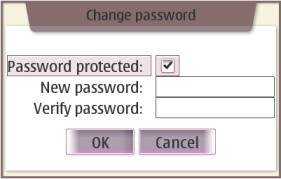
Used to receive a new password from user. (User sets the password).
Description
Used to receive a new password from user. (User sets the password).
Ancestry
Up to the first non-hildon ancestor:
...
 +-- gtk.Dialog
      +-- hildon.SetPasswordDialog
Usage Example
import gtk
import hildon

def set_password(widget, label, window):
    passwordDialog = hildon.SetPasswordDialog(window, False)
    response = passwordDialog.run()
    passwordDialog.hide()

    if response == gtk.RESPONSE_OK:
        label.set_text("Your ultra-secret password is \"%s\"." % passwordDialog.get_password())
    else:
        label.set_text("No password set.")

    passwordDialog.destroy()

window = hildon.Window()
window.set_title("Test App")

label = gtk.Label("No password set.")

button = gtk.Button("Click set a password")
button.connect("clicked", set_password, label, window)

vbox = gtk.VBox(False, 10)
vbox.pack_start (button)
vbox.pack_start (label)
window.add(vbox)

window.show_all()

gtk.main()
Properties
| Name | Access | Description |
|---|---|---|
"domain" |
Read/Write | Set Domain (content) for domain label. |
"modify_protection" |
Read/Write/Construct Only | Set type to dialog. |
"password" |
Read/Write | The current password set. |
Constructor
Creates a new hildon.SetPasswordDialog.
hildon.SetPasswordDialog(parent, modify_protection)
|
|
|---|---|
parent |
Its parent window. |
modify_protection |
True creates a new "change password" dialog and False creates a new "set password" dialog. |
| Returns | A new hildon.SetPasswordDialog. |
Methods
get_password
Returns the current password set.
hildon.SetPasswordDialog.get_password()
|
|
|---|---|
| Returns | The current password set. |
get_protected
Returns protection mode.
hildon.SetPasswordDialog.get_protected()
|
|
|---|---|
| Returns | Password protection mode ( True when the protection is 'ON' and False when the protection is 'OFF' ) . |
set_domain
Sets the optional descriptive text.
hildon.SetPasswordDialog.set_domain(domain)
|
|
|---|---|
domain |
The domain or some other descriptive text to be set. |
Improve this page