

hildon.Note
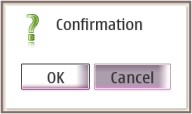
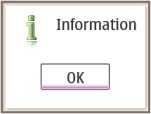
A widget to ask confirmation from the user or to show some information to him.
Description
Notes are used to ask a confirmation (Ok/Cancel/etc.) from the user. A simple note contains an information text and an Ok-button to be pressed. Additional features can be e.g. progressbars or animations.
Ancestry
Up to the first non-hildon ancestor:
...
 +-- gtk.Dialog
      +-- hildon.Note
Usage Example
Confirmation Note
import gtk
import hildon

def on_show_note(widget, window, button):
    dialog = hildon.Note ("confirmation", (window, "Are you sure?", gtk.STOCK_DIALOG_WARNING) )
    dialog.set_button_texts ("Yes", "No")
    response = dialog.run()
    dialog.destroy()

    if response == gtk.RESPONSE_OK:
        button.set_label("Confirmed")
    else:
        button.set_label("Canceled")

window = hildon.Window()
window.set_title("Test App")

button = gtk.Button("Click to confirm.")
window.add(button)
button.connect("clicked", on_show_note, window, button)

window.show_all()

gtk.main()
Information Note
import gtk
import hildon

def on_show_note(widget, window):
    dialog = hildon.Note ("information", (window, "That's some important info.", gtk.STOCK_DIALOG_INFO) )
    dialog.set_button_text("Alright")
    dialog.run()
    dialog.destroy()

window = hildon.Window()
window.set_title("Test App")

button = gtk.Button("Click to have some info.")
window.add(button)
button.connect("clicked", on_show_note, window)

window.show_all()

gtk.main()
Properties
| Name | Access | Description |
|---|---|---|
"note_type" |
Read/Write/Construct | The type of the note dialog. |
"description" |
Read/Write | The text that appears in the note dialog. |
"icon" |
Read/Write | The name of the icon that appears in the note dialog. |
"progressbar" |
Read/Write | The progressbar that appears in the note dialog (if it has one). |
Constructor
Creates a new hildon.Note widget. Its type is specified in the note_type argument.
Each type of hildon.Note needs a different set of arguments, both in quantity and in quality.
To handle this, note_type states the desired type and note_tuple contains a
tuple having the arguments needed by the specified note type. The following table relates a note type with its
correspondent note_type value and note_tuple format:
| Note Type | note_type value |
note_tuple format |
|---|---|---|
| Confirmation | "confirmation" |
(parent, description, icon_name(optional)) |
| Information | "information" |
(parent, description, icon_name(optional)) |
| A progress bar with a "Cancel" button | "cancel_with_progress_bar" |
(parent, description, progress_bar) |
| Tuple Arguments | |
|---|---|
parent |
Its parent window. |
description |
The note's message/description. |
icon_name (optional) |
Name of the icon to be used in the dialog (e.g.: gtk.STOCK_DIALOG_WARNING). If not specified, the default icon will be used. |
progress_bar |
The gtk.ProgressBar to be used by this note. |
hildon.Note(note_type, note_tuple)
|
|
|---|---|
note_type |
The type of the Note widget. |
note_tuple |
A tuple containing the construction parameters according to the note type specified in note_type |
| Returns | A new hildon.Note widget. |
Methods
set_button_text
Sets the button text to be used by this hildon.Note widget.
hildon.Note.set_button_text(text)
|
|
|---|---|
text |
Sets the button text and if there are two buttons in the dialog the button's texts will be <text> and "Cancel". |
set_button_texts
Sets the button texts to be used by this hildon.Note widget.
hildon.Note.set_button_texts(textOk, textCancel)
|
|
|---|---|
textOk |
The new text for the "Ok" button. |
textCancel |
The new text for the "Cancel" button. |
Improve this page