

hildon.ColorSelector
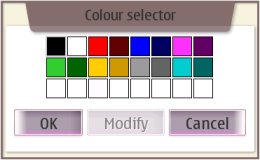
A widget for selecting a color.
Description
hildon.ColorSelector allows a selection of a color. It consists of a control that
displays the default palette of 16 colors and a control that can be opened to select a custom color
from a 16M color palette.
Ancestry
Up to the first non-hildon ancestor:
...
 +-- gtk.Dialog
      +-- hildon.ColorSelector
Usage Example
import gtk
import hildon

def color_selected(widget, label, window):
    color_selector = hildon.ColorSelector(window)

    color_selector.run()
    color = color_selector.get_color()
    color_selector.destroy()

    label.set_text("Selected color is: (red=%s, green=%s, blue=%s, pixel=%s)" %
                   (color.red, color.green, color.blue, color.pixel))

window = hildon.Window()
window.set_title("Test App")

label = gtk.Label("No color has been selected yet...")

button = gtk.Button("Click here to select a color")
button.connect("clicked", color_selected, label, window)

vbox = gtk.VBox(False, 10)
vbox.pack_start (button)
vbox.pack_start (label)
window.add(vbox)

window.show_all()

gtk.main()
Properties
| Name | Access | Description |
|---|---|---|
"color" |
Read/Write | The selected color. |
Constructor
Creates a new hildon.ColorSelector dialog with 3x8 layout of base colors and
'OK', 'Modify' and 'Cancel' buttons.
hildon.ColorSelector(parent)
|
|
|---|---|
parent |
The parent window. |
| Returns | A new hildon.ColorSelector. |
Methods
get_color
Gets the currently selected color as gtk.gdk.Color.
hildon.ColorSelector.get_color()
|
|
|---|---|
| Returns | A copy of the currently selected gtk.gdk.Color. |
set_color
Select the color specified. Does nothing if the color does not exists among the standard colors.
hildon.ColorSelector.set_color(color)
|
|
|---|---|
color |
gtk.gdk.Color to set. |
Improve this page