#include <file-selection.h>
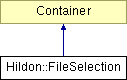
Inheritance diagram for Hildon::FileSelection:
Public Member Functions | |
| virtual | ~FileSelection () |
| HildonFileSelection * | gobj () |
| Provides access to the underlying C GtkObject. | |
| const HildonFileSelection * | gobj () const |
| Provides access to the underlying C GtkObject. | |
| FileSelection (const Glib::RefPtr< FileSystemModel > &model) | |
| void | set_mode (FileSelectionMode mode) |
| Swithces file selection between list and thumbnail modes. | |
| FileSelectionMode | get_mode () const |
| Gets Current view mode for file selection widget. | |
| void | set_sort_key (FileSelectionSortKey key, Gtk::SortType order) |
| Changes sort settings for views. | |
| void | get_sort_key (FileSelectionSortKey &key, Gtk::SortType &order) const |
| Currently active sort settings are stored to user provided pointers. | |
| bool | set_current_folder (const GtkFilePath *folder, std::auto_ptr< Glib::Error > &error) |
| Changes the content pane to display the given folder. | |
| GtkFilePath * | get_current_folder () const |
| Gets a path to the currently active folder (the folder which is displayed in the content pane). | |
| Gtk::TreeModel::iterator | get_current_folder_iter () const |
| bool | select_path (const GtkFilePath *path, std::auto_ptr< Glib::Error > &error) |
| Selects the given file. | |
| void | unselect_path (const GtkFilePath *path) |
| Unselects a currently selected filename. | |
| void | select_all () |
| Selects all files from the content pane. | |
| void | unselect_all () |
| Clears current selection from content pane. | |
| void | clear_multi_selection () |
| Otherwise similar to hildon_file_selection_unselect_all, but keeps the node with cursor selected. | |
| GSList * | get_selected_paths () |
| Gets list of selected paths from content pane. | |
| void | set_select_multiple (bool select_multiple=true) |
| If multiple selection is enabled, checkboxes will appear to the last item to the content pane. | |
| bool | get_select_multiple () const |
| Gets state of multiple selection. | |
| void | set_filter (const Gtk::FileFilter &filter) |
| Only the files matching the filter will be displayed in content pane. | |
| Gtk::FileFilter * | get_filter () |
| Get currently active filter set by hildon_file_selection_set filter. | |
| const Gtk::FileFilter * | get_filter () const |
| Get currently active filter set by hildon_file_selection_set filter. | |
| void | dim_current_selection () const |
| Appends currently selected paths to set of dimmed paths. | |
| void | undim_all () |
| Undims all from model that are dimmed by code. | |
| FileSelectionPane | get_active_pane () const |
| Gets the pane that either has active focus or (in case of no pane has it) last time had it. | |
| void | hide_content_pane () |
| Hides the content pane. | |
| void | show_content_pane () |
| Shows the content pane. | |
| Glib::SignalProxy0< void > | signal_current_folder_changed () |
| Glib::SignalProxy0< void > | signal_file_activated () |
| Glib::SignalProxy0< void > | signal_selection_changed () |
| Glib::SignalProxy0< void > | signal_navigation_pane_context_menu () |
| Glib::SignalProxy0< void > | signal_content_pane_context_menu () |
| Glib::SignalProxy2< void, GtkFilePath *, GSList * > | signal_items_dropped () |
| Glib::SignalProxy1< void, GtkTreeIter * > | signal_location_insensitive () |
Related Functions | |
| (Note that these are not member functions.) | |
| Hildon::FileSelection * | wrap (HildonFileSelection *object, bool take_copy=false) |
|
|
|
|
|
|
|
|
Otherwise similar to hildon_file_selection_unselect_all, but keeps the node with cursor selected. Thus, this function don't have any efect in single selection mode. |
|
|
Appends currently selected paths to set of dimmed paths. Note that dimmed paths cannot be selected, so selection no longer contains the same paths after this function. |
|
|
Gets the pane that either has active focus or (in case of no pane has it) last time had it.
|
|
|
Gets a path to the currently active folder (the folder which is displayed in the content pane). You have to release the returned path with gtk_file_path_free.
|
|
|
|
|
|
Get currently active filter set by hildon_file_selection_set filter.
Can be
|
|
|
Get currently active filter set by hildon_file_selection_set filter.
Can be
|
|
|
Gets Current view mode for file selection widget. If widget is not shown this will return an invalid mode (-1). This is because of Gtk::Notebook implementation.
|
|
|
Gets state of multiple selection.
|
|
|
Gets list of selected paths from content pane. You have to release the returned list with gtk_file_paths_free. If you are interested in item that (probably) has active focus, you have to first get the active pane and then call either hildon_file_selection_get_selected_paths or hildon_file_selection_get_current_folder.
|
|
||||||||||||
|
Currently active sort settings are stored to user provided pointers.
|
|
|
Provides access to the underlying C GtkObject.
|
|
|
Provides access to the underlying C GtkObject.
|
|
|
Hides the content pane. This is used in certain file management dialogs. |
|
|
Selects all files from the content pane. Multiple selection must be enabled before calling this. |
|
||||||||||||
|
Selects the given file. If the path doesn't point to current folder the folder is changed accordingly. If multiple selection is disabled then the previous selection will dissappear.
|
|
||||||||||||
|
Changes the content pane to display the given folder.
|
|
|
Only the files matching the filter will be displayed in content pane.
Use
|
|
|
Swithces file selection between list and thumbnail modes. Note that this function works only after widget is shown because of Gtk::Notebook implementation.
|
|
|
If multiple selection is enabled, checkboxes will appear to the last item to the content pane. Multiple selection must be enabled if one wants to call hildon_file_selection_select_all.
|
|
||||||||||||
|
Changes sort settings for views. Key only affects content page, navigation pane is always sorted by name.
|
|
|
Shows the content pane. This is used in certain file management dialogs. The content pane is shown by default. Calling this is needed only if you have hidden |
|
|
|
|
|
|
|
|
|
|
|
|
|
|
|
|
|
|
|
|
|
|
|
Undims all from model that are dimmed by code. Simply calls hildon_file_system_model_reset_available for underlying model. |
|
|
Clears current selection from content pane.
|
|
|
Unselects a currently selected filename. If the filename is not in the current directory, does not exist, or is otherwise not currently selected, does nothing.
|
|
||||||||||||
|
|
 1.4.6
1.4.6