



Initial Thoughts on the Nokia N810
From http://feeds.feedburner.com/~r/featuredmaemoapps/~
Posted on 2007-10-22 02:46:13 UTC.
As you know by now I was lucky to be invited to the N810 launch last week and additionally have one to play with and test prior to the official launch in a few weeks time.
I would first like to thank WomWorld for their amazing invitation to be part of such exciting release! Through their relationship with Nokia, Reggie, Daniel and I were able to gain VIP access to the product managers as well as quite a few other members of the Nokia N-Series and Converged Device groups. This was a terrific experience for all of us as their was plenty to learn from everyone!

The Tablet … WOW!
Let me just say I am in love with this new device! The N810’s we have are still considered pre-production, but are very close to release and are very polished. The build quality feels outstanding and while there’s a certain heft to the N810, it is by no means heavy, but feels solid in your hand. The metal body is smaller than previous tablets but still retains the great screen we’ve grown accustomed to from the original 770. Now, however the screen is readable in direct sunlight and actually brighter than the N800’s.

When you slide the screen upwards to reveal the keyboard, you get a very satisfying click as it settles into place. The N810 is easily held in one or both hands in either slate or open modes and when closed it easily slides into your front pant pocket or nicely inside a jacket.
Button arrangement is a bit different as has been the case with each successor in the Internet Tablet line. There’s a hardware slider which lets you lock and unlock the device if you choose to keep things in slate mode. When you slide the tablet open, it will unlock automatically. Closing it however, does not lock it back so something to take note of if you are quickly dropping it into the sleeve and into your pocket. The zoom keys on the top left are now separated from the fullscreen button and the power button is alone in the middle on the top side.
Using the N810
Startup times seem much quicker than my recently reflashed N800… Not sure why that is, but it’s appreciated nonetheless. I don’t really turn the tablet off very often, but if you are “one of those” it’s ready very quickly.
The Home screen is gorgeous! The two included themes include transparent applets and the area itself is live, meaning you can move things around at will. You will most likely do this by accident as we all did at first. There’s been suggestions to enable a lock feature, but I am not sure that will happen for release. I actually like it now that I know things can just move…

In general, performance of the N810 feels snappier than the N800. There have been some optimizations with regard to the CPU utilization as well as I am sure to the OS which are helping here.
One major difference in this tablet is obviously the keyboard and as a result the on-screen keyboard has been deactivated by default. While I initially turned this back on since that’s where I was most comfortable, I’ve since deactivated it and have been working only with the real thing.
While you are not free from the stylus just yet, a great deal of work has been done to emphasize finger tapping in addition and the more I’ve used the N810 over the past few days the less I’ve sought the stylus in open mode. As things are not totally finger optimized (open menus in applications) in slate mode, the stylus makes good sense, particularly in clicking links in the browser.
The Full internet in your pocket!
A great deal of work has been done on this machine and the OS2008 release to enable the full power of the CPU as it directly relates to your browsing experience. You don’t have to seek out a mobile web page unless that’s your preference as you’ll be able to view any site you want. I don’t think it’s a coincidence (anyone remember the iPhone launch?) that Facebook is a default bookmark, and it’s not some special version of Facebook, it’s the full version with all your applications running as you know they do from your desktop. Wow!
The Flash 9 plugin and the Mozilla based browser (which needs a branded name) can take on just about anything. My only issue to date has unfortunately been Google Reader which is a site I spend a great deal of time on… My guess is that the real issue is my decision to try and track close to 1200 feeds. I’m in the process of drastically pruning this and will report back.
YouTube, Check! No need to work around YouTube if you get a link, it plays just fine - seriously. The video quality is really nice and you can also choose to view the YouTube mobile version and see things in H.264 if you like.
What’s else is new?
Hardware basics … GPS, Transflective and brighter screen, MiniSD, MicroUSB, the button arrangement and a programable LED. Full specs are on the Nokia site.
My experience with the GPS has been limited based on some issues I’ve had getting a connection with the sky. After waiting for close to 10 minutes I paired my Nokia LD-3W and it connected cold (battery was even dead) a few moments after it powered on and paired. I’m hoping that the GPS issues is a pre-release problem. While you can get better battery life and signal with an external GPS, all in one is very convenient.
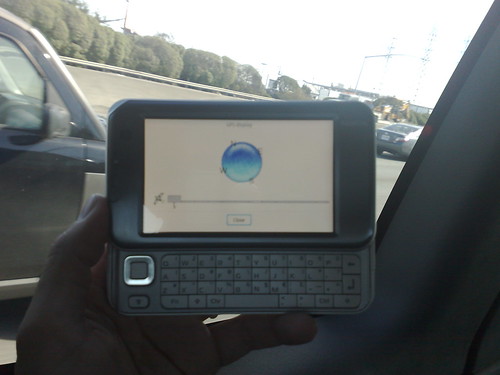

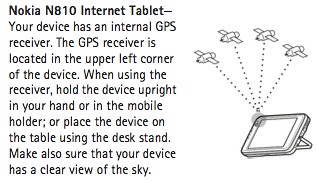
The GPS antenna is apparently located on the top front left corner …
The keyboard has taken a couple of days to get comfortable, but I am now able to type quite quickly now without making too many mistakes. There are no raised bumps on the F and J keys as you usually see on keyboards so getting started in a low light situation may be tricky, but once you get going and the backlight activates it’s no problem at all.
The keyboard really makes a difference in email too - I’ve been zipping through Gmail with keyboard shortcuts and can easily compose replies and new messages on the go. Once a few applications are compiled the tablet will be a great mobile note taking and mobile blogging (WordPY!)solution as well.
Software… available in OS2008 and soon for the N800 as well
- Panels are the new way applications are arranged in groups. You can change things around of course to your liking.
- Active Applications give you much more of a view into what’s happening. You can see multiple IM indicators as well as a bunch of new mail messages from within the floating display.
- There’s something called Tray Balloons (think that’s the official name - I saw it referenced in XChat) which float over full screen mode windows or highlight in the lower left corner in window mode. These can indicate new messages from IM, Mail and IRC Missed calls etc… I have a feeling we’ll see others as applications are updated for this new OS.
- Backup and Restore has been significantly enhanced. While it still does not automatically restore your applications, all the source info is retained which should make it considerably easier to re-install. We discussed this quickly with the product managers and they indicated much had been done, but it is still moving towards a more ideal scenario. You can now Backup and Restore email messages, Doc and Media files, settings, bookmarks, contacts and your applications list. Upon restore, you are suppose to see any repositories you had installed and from the applications manager any app that had been installed in this way. If you installed from the terminal or via a .deb, you are out of luck in this process for the time being.
- The media player now contains an Internet Radio directory which is managed by Nokia. You can browse by genre or even country and find something good to hear. Anything you bookmark is added to your home screen applet. Out of the box, there are five BBC radio stations programmed and ready to go.
- Speaking of Media, the codec support has been greatly enhanced and you can now plan to enjoy MP4 as well as WMV video for the first time.


- Applications — Because the new OS 2008 contains many under the hood changes, developers need to recompile in order to release and thus far this has understandably not happened en-masse. I’ve installed and tried FBReader, XChat and Maemopad+. I am really looking forward to getting some oldies back as well as seeing what new treats arrive. The GPS has an API which will hopefully lead to some location aware / presence applications (Ovi Anyone?). Once python gets released this coming week, we should see the return of quite a few N800 applications as well.
Stock applications include Skype, Rhapsody, Gizmo as well as a few games (Chess, Blocks, Mahjong and Marbles). The terminal application is also included which is great as I’ve certainly had to install it on previous devices and have needed it for various activities. Based on recent Nokia announcements as well as known partnerships, I think we’ll see Devicescape, Boingo and MP3Tunes at the very least in the Tableteer site, if not as ready to install pieces on launch.
The Nokia N810 is a worthy successor to the Internet Tablet line and something I think a lot of people will really enjoy. I feel like I’ve written quite the long post here, but yet have only scratched the surface. I’m working on some video and will have that shortly to share as well.
Technorati Tags:
A-GPS, bluetooth, DUN, Firmware, Gizmo Project, Gmail, Google, Google Maps, GPS, Internet Tablet, LD-3W, Maemo, Marketing, N-Series, N810, Navigation, Nokia, Nokia Maps, open, Presence, SiRF, Social Networking, Streaming, Travel, unlocked, Video, Web 2 Summit, WiFi, wireless, womworld, YouTube