



Howto: Enable Graphics in HTML mail
From http://feeds.feedburner.com/~r/featuredmaemoapps/~
Posted on 2008-06-26 22:49:24 UTC.
This is such a simple tip I can’t believe I did not discover it sooner, but thanks to reader Mobiledivide, I’ve learned how you can very easily enable graphics in the Modest mail client. This should work for Diablo as well as pre-Diablo installs of Modest.
Via the Maemo Extras repository, download an application called gconf-editor, which will let you control all kinds of interest settings for various apps. I imagine you might be able to do some damage if you are not too careful, but for this purpose, all should be fine.
Once installed, fire it up and navigate to Apps / Modest. You should see something that looks like this:
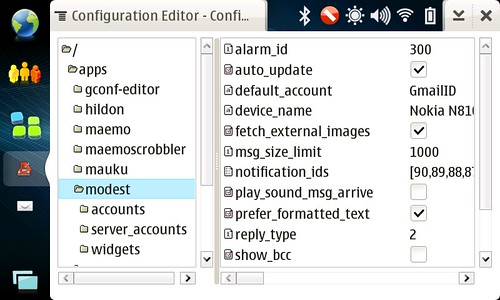
I’ve already checked the fetch external images option which is what you need to check in order to get HTML mail fully enabled. That’s it. Enjoy!
Technorati Tags: modest, diablo, chinook, maemo, html, images email