



Extras downloads
downloads served for Maemo 5 (Last update: 2014-06-21 10:52)
Hot


Votes: 2

A rebuild of harmattan black theme by Harick, used with theme customizer, providing the awesome Meego UI for your N900. special thanks to Harick & TransTech
Votes: 9
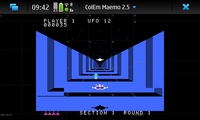
ColecoVision emulator
ColEm will run software written for ColecoVision videogame console.

Votes: 5
A userContent.css file which blocks ads. Also disables Flash from being shown until clicked upon.
Votes: 8
Classic Real-Time Strategy game
OpenDUNE is an open source re-creation of the popular game “Dune II”, originally made by Westwood Studios.
Votes: 3
Speedometer with time and distance measurement
Speedometer with time and distance measurement. Uses N900 built-in GPS.Features total distance and a trip time measurement and time measurement with 1/10s accuracy.
Votes: 28
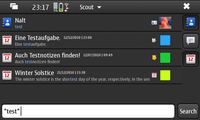
Search Contacts, Conversations and Calendar
Query multiple words, a phrase enclosed in quotes use +/- for +MUST_INCLUDE -MUST_NOT_INCLUDE words. You can define a time frame for search in calendar and conversations or select the calendarevent type (todo, note, events) to search for.
Votes: 5
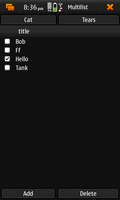
Simple list management application
Votes: 0
A Sudoku Game playable with fingers (ymmv).

Votes: 3
downgrade overclock over a certain temperature in n900 with Titan's/Pali's kernel
Votes: 1
Read barcodes that contain wifi information to connect to wifi networks.
Votes: 8
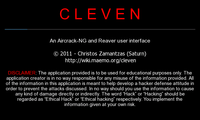
Cleven is a user interface of aircrack-ng and reaver for the N900.
DISCLAIMER: The application provided is to be used for educational purposes only. The creator is in no way responsible for any misuse of the information provided. All of the information in this application is meant to help develop a defence attitude to prevent the attacks discussed. In no way should you use the information to cause any kind of damage directly or indirectly.
Votes: 30
Secure shell server, an rshd replacement
This is the portable version of OpenSSH, a free implementation of the Secure Shell protocol as specified by the IETF secsh working group.
Ssh (Secure Shell) is a program for logging into a remote machine and for executing commands on a remote machine. It provides secure encrypted communications between two untrusted hosts over an insecure network. X11 connections and arbitrary TCP/IP ports can also be forwarded over the secure channel. It is intended as a replacement for rlogin, rsh and rcp, and can be used to provide applications with a secure communication channel.
This package provides the sshd server.
In some countries it may be illegal to use any encryption at all without a special permit.

Votes: 9
IivilSteel High Contrast Theme For N900 / Maemo 5 devices. After installation or upgrade it's required to first go and select / re-select the IivilSteel Light -theme to use and then do a reboot. Bugtracker & Project page: https://garage.maemo.org/projects/iivilsteel/

Votes: 3
Measure time in various ways
Measure time using countdown timer and stop clock (and later chess clock...)

Votes: 0
Wolfestein 3D.
Classic FPS game ported to Maemo 5. Copy original game files (wl6 extension) to MyDocs/.wolf3d or MyDocs/wolf3d to play the game.

Votes: 13
Free clone of "Flood-It!" puzzle game.
"Color Flood" is a free, opensource 2D game in which player selects colors to flood an area.

Votes: 13
A funny 2D tennis game
Tennix is a funny tennis game in 2D, controllable via the D-Pad or a touchscreen. If your have a hardware keyboard (either on your tablet or an external one), you can even play against friends (player 2 plays using O, L and K).
Votes: 387
Simple brightness statusarea applet
Allows you to: * Adjust the brightness from 1-5; * Launch the Display Settings Control Panel applet; and * Keep the backlight on.
Votes: 5
Provides D-Bus interface for reading proximity sensor.
Daemon polling proximity sensor and emitting D-Bus signals. Signals are emitted on state change (open and closed). Polling can be started and stopped on demand by application.

Votes: 8
A speed testing game
A speed testing game where you have to push colored buttons as they blink.
Votes: 47
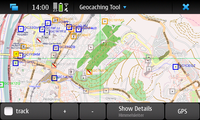
Tool for online and offline geocaching
Advanced geocaching tool for Linux downloads geocaches including their description, hints, difficulty levels and images. Searching for caches in your local database is a matter of seconds. Premium account needed for premium caches.
- Map view - supporting Open Street Maps and Open Cycle Maps by default, configurable for other map types, including google maps.
- GPS view - shows the distance and direction to the selected geocache.
- Cache details - all necessary details are available even in offline mode.
- Paperless geocaching features - take notes for a geocache on the go, see the hints and spoiler images, check the latest logs.
- Multicache calculation help - Let your phone do the math for you. Working for some of the multi-stage geocaches, AGTL finds the coordinate calculations and let you enter the missing variables.
- Fieldnotes support - Ever came home after a long tour and asked yourself which geocaches you found? Never again: Log your find in the field and upload notes and log text when you're at home. Review them on the geocaching website and post the logs.
- Text-to-Speech-Feature! - Select a target, activate TTS and put your headphones on to enjoy completely stealth geocaching.
- Download map tiles for selected zoom levels - for offline use.
- Advanced waypoint handling - AGTL finds waypoints in the geocache descriptions, in the list of waypoints and even in your notes. For your convenience, they're displayed on the map as well - see where you have to go next.
- Search for places - in the geonames.org database to navigate quickly.
- Sun compass - Compensates the lack of a magnetic compass.
- Instant update feature - Follow web site updates as soon as possible.

Votes: 2
OpenJazz is a free, open-source version of the classic Jazz Jackrabbit games.
To play, you will need the files from one of the original games. Copy them to MyDocs/.openjazz or MyDocs/openjazz folder. Check http://www.alister.eu/jazz/oj/faq.php for supported versions.

Votes: 12
Classic snake game using Qt

Votes: 14
Check your reflex with this classic game
Touch hen to make Motu(fat boy) catch egg produced from that hen.
Votes: 3
Eases to switch on/off speakers while on the phone and answer/end phone calls
Creates shortcuts to easily switch the speakers on and off or answer or end calls while you are either making phone call or speaking on the phone. This has no effect when the headphone or bluetooth headset is plugged in. Currently, answering and ending calls only work for standard calls and not on Skype and GTalk. Shortcuts available are: 1) Sliding out/in keyboard turns on/off speakers respectively. 2) Half pressing and releasing camera button (It turns speakers on if they are off and vice-versa). 3) Uses proximity sensor to turn on/off speakers while on the phone. 4) Long (1 sec) half pressing camera button answers or ends the call. 5) Open dashboard when the speakers are turned on. 6) Half (1/2 sec) press camkey to toggle proximity when in use. 7) Half pressing camkey while answering call disables proximity